An open-source, native Android gallery with end-to-end encrypted Proton Drive sync, built-in photo & video editors, and per-field metadata stripping.

GPL-3.0
Open source
Android 8+
Minimum version
No telemetry
Zero trackers
01 · Gallery

A native Android gallery.

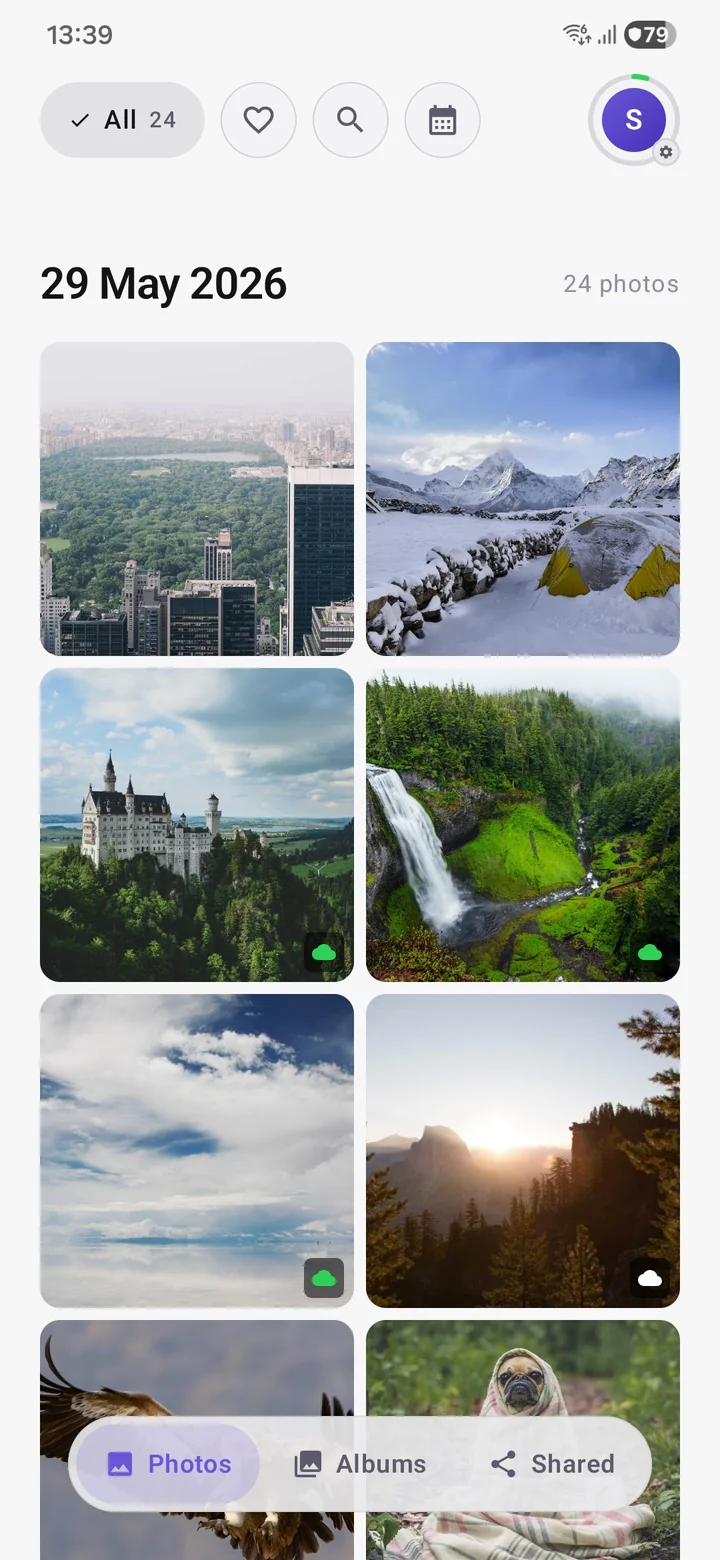
Timeline, calendar, albums, favourites, hidden vault, search and filters. Built with Jetpack Compose.

  • Timeline with pinch-zoom grouping by day, month, or year
  • Calendar: one continuous view with month snapping and type-to-jump search, every day with a hero photo
  • Unified view: local and Proton Drive photos in one place
  • Search by filename, media type, sync state, or year / month
  • Filter by sync state, type, favourites, or categories (Screenshots, Selfies, Portraits, Bursts, RAW…)
  • Multi-select bulk actions: download, hide, delete, add to album, strip metadata, in the timeline, shared albums and the hidden vault
  • Browse the folders on your device, each with its own page
  • A photo map from Search: located photos plotted as thumbnail pins, tap a place to open it or save it as an album
  • Type badges on device photos in the timeline: live, motion, video, RAW and panorama
  • RAW photos like DNG get a thumbnail and full preview, in the app and on the web
  • A details sheet with the place name, resolution and length, the same for photos, videos and Drive files
  • Share photos and videos to other apps, from the gallery, an album or a folder
Gallery view in Photos for Proton showing a timeline grid of synced and device-only photos
02 · Sync

End-to-end encrypted backup to Proton Drive.

Sign in with your Proton account and the app starts backing up your library. Files are encrypted on-device, via the official protoncore_android library, before they leave.

  • “Back up everything” mode or selective per-folder backup
  • Continuous background sync, Wi-Fi only optional, exclude folders from "Back up everything"
  • Reinstall pairing, backed-up photos and videos rejoin Synced more reliably after a clean install
  • Mirror to local (opt-in), the metadata you strip on upload is applied to your on-device copy too, so your local copy reflects the same changes
  • Backups run quietly in the background, the always-on backup notification is off by default
  • One-tap bulk free-up: remove every device copy that's safely on Drive
  • Mirror device folders to matching Drive albums, kept in sync as you back up
  • Back up a whole device folder or hand-pick individual photos, with live progress
  • Back up local photos straight from the Photos grid or viewer, with the upload continuing in the background after you leave
  • Thumbnails decrypt in the background, so the grid fills in ahead of you instead of only as you scroll
  • Timeline filter: hide chosen device folders and album photos from the Photos timeline
  • Offline browsing, cached photos and videos work without a network
  • Original quality, no re-compression; in-app cloud trash to restore or delete forever
Settings screen showing live backup progress with a per-file pill list and a percent indicator
03 · Privacy

Privacy & metadata controls.

Choose what leaves your device. Remove GPS, camera model, timestamps, or software info before upload, each field individually. Sensitive photos can live in a Hidden album behind biometric or PIN.

  • Per-field EXIF stripping before upload: GPS, camera, timestamps, software info
  • Location stripped from videos too, not just photos, when stripping is on
  • Hidden vault behind biometric or PIN, with heavy blur overlay everywhere
  • App-wide lock with configurable timeout (immediate, 1, 5, 10, 15 min, or 1 hour)
  • Bulk metadata stripping for photos that are already uploaded
  • No analytics or crash-reporting SDKs added; the app sends no telemetry of its own
Privacy & Metadata screen with the master Strip-on-upload toggle and per-field switches for GPS, camera info, timestamps, and software info
04 · Edit

Photo & video editor.

Eight adjustments, Auto-fix, filter presets, redact and free-form crop on photos. Trim, crop, rotate and add music overlays on videos. Save edits as a new copy, or overwrite the original with a system consent prompt.

  • Photo: brightness, exposure, contrast, highlights, shadows, saturation, tone, temperature
  • Auto-fix one-tap enhancement and filter presets (Vivid, Warm, Cool, B&W, Sepia, Vintage)
  • Redact / censor: black bar or pixelate over sensitive areas
  • Rotate, flip, free-form crop with aspect-ratio presets (1:1, 4:3, 3:4, 16:9, 9:16)
  • Video editor: trim, crop, rotate, music overlay with audio trim
  • Undo / redo at every step; works on local files and on cloud-hosted videos
Built-in photo editor with the Pixelate redact tool active to hide sensitive areas
05 · Toolkit

Also included.

All of the following ship in the base APK. A Proton account is required for cloud sync.

01 · Sync

End-to-end Drive backup

Encrypted on-device via protoncore_android. Keys never leave your device.

02 · Privacy

No added trackers

No analytics or crash-reporting SDKs added by us. ProtonCore is bundled unmodified and follows your Proton account settings. The manifest is in the public source tree.

03 · Security

Hidden vault

Locked behind biometric or PIN, with a heavy blur overlay on both the grid and viewer.

04 · Metadata

Per-field stripping

Strip GPS, camera model, timestamps and software info before upload. Granular per-field toggles. Optionally mirror the same strip to your on-device copy too.

05 · Albums

Cloud-native, shareable albums

Every album you create lives on Proton Drive and is ready to share by email. Device folders sit alongside them, with optional folder-to-album mirroring.

06 · Photo editor

8 adjustments + Auto-fix

Brightness, exposure, contrast, highlights, shadows, saturation, tone, temperature, presets, redact, crop.

07 · Video editor

Trim, crop, music

Trim and crop video, add a music overlay with audio trim, save as a copy. Works on cloud-hosted videos too.

08 · Calendar

Calendar view

One continuous calendar that snaps month by month, with a type-to-jump search by month or year. Every day gets a hero photo, editable place and description.

09 · Search

Search & filters

Filename, media type, sync state, year, month. Categories like Screenshots, Selfies, Portraits, Bursts, RAW.

10 · Storage

One-tap bulk free-up

Removes every photo from this device that is already safely backed up to Proton Drive.

11 · Widget

Home-screen widget

Photo widget with four modes: all photos, a selected set, a specific album, or photos from your encrypted cloud cache. Refreshes on your schedule.

12 · Themes

6 palettes, 6 languages

Default, Forest, Sunset, Sea, Sepia and Mono palettes. Light / dark / system theme. English, Hungarian, German, Spanish, French, Italian.

13 · Timeline

Timeline filter

Pick which device folders and album photos show on your Photos timeline. A display-only filter, nothing is deleted or moved.

14 · Map

Photo map

Open from Search to see your located photos, on-device and on Drive, as thumbnail pins on dark map tiles. Tap a place to open it, search a city, or save a spot as an album. Place names work offline.

06 · About

A third-party Android client.

An independent, third-party Android client for Proton Drive Photos. Built against the publicly documented Drive API, no private endpoints, no proprietary code, no obfuscation. All gallery code is written from scratch in eu.akoos.photos; the official protoncore_android libraries (pinned to v36.6.0) are consumed unmodified for authentication, crypto, and Drive sync. GPL-3.0, source on GitHub, build it yourself from the tagged source.

07 · FAQ

FAQ

Anything else? Open an issue or discussion on GitHub.

Is this an official Proton app?
No. Photos for Proton is an independent, third-party app built by Akoos (gitakoos on GitHub). It uses Proton's official open-source libraries (protoncore_android) to talk to Proton Drive, but it is not built, endorsed, or supported by Proton AG.
What is it built on?
Kotlin + Jetpack Compose + Material 3 for the UI. Hilt for dependency injection, Room for the local catalogue, Coil for image loading, Media3 / ExoPlayer for video playback and the video editor, AndroidX scheduling for background sync, Glance for the home-screen widget. Proton's protoncore_android library is pinned to v36.6.0 and consumed unmodified for authentication, key management, and Drive sync. No proprietary SDKs.
Does it fit into the Proton ecosystem?
Yes. Because the app uses protoncore_android, the same library Proton's own apps are built on, your sign-in, account, encryption keys, and Drive storage all behave identically to the official clients. Your photos land in your Proton Drive Photos folder.
Does the app send any telemetry?
The app adds no analytics or crash-reporting SDKs and sends no telemetry of its own. It talks to Proton's API to authenticate and sync your photos, to GitHub when it checks for a new release, and uses encrypted DNS (Quad9 or Cloudflare) for connectivity. ProtonCore is bundled unmodified and follows your Proton account's telemetry setting.
Do I need a Proton account?
Yes, a Proton account is required. The app is designed around Proton Drive sync, so it signs in to Proton on first launch. Any account works, including free; cloud usage counts against your existing Proton Drive quota.
Where can I get it?
Signed APKs are published on the GitHub releases page. There is no Google Play release planned, the app deliberately avoids Play Services. See the Download section.
Does the app strip EXIF / metadata from my photos?
Yes. In Settings → Privacy & metadata there is a master "strip on upload" switch plus individual toggles for GPS & location, camera make & model, timestamps, and software info. Stripping happens on-device before upload. The original local file is not modified.
How do albums work?
Albums are references, not folders, both on Proton Drive and on device. Adding a photo to an album never moves it. Your files keep their original capture dates and stay in their original location.

Every album you create now lives on Proton Drive, so it picks a cover automatically, survives a re-install, and is ready to share by email with viewer or editor access. Alongside your albums you'll see device folders like Camera and Screenshots (read-only inside the app, system folders), and you can mirror any device folder to a matching Drive album so it stays in sync as you back up.
What happens to my albums if I uninstall the app?
Anything you've backed up, including its album membership, is safe on Proton Drive and reappears the moment you sign back in. Local-only photos (never uploaded) keep their files but lose the in-app album organization, because that lived in the app's data folder which Android wipes on uninstall. Device folders like Camera survive unchanged.
Can I share an album with someone?
Yes. Open any album, invite people by email, and choose whether each person can view or edit, you can change that later, even on invites that are still pending. You can see who has access, remove someone, or stop sharing at any time. Recipients open the album end-to-end encrypted on Android and on Proton Drive web, and albums shared with you show up in the Shared tab, where you can browse full quality and save a whole album into your own library. Albums shared with you open straight from your cache, and large ones load fast.
How do updates work without Google Play?
The app checks the GitHub Releases page for a newer signed APK and offers to download and install it for you in one tap. You can also grab any release manually from GitHub Releases at any time. Updates are opt-in, and the app talks to Proton's API, to GitHub for the release check, and to encrypted DNS resolvers for connectivity.
Download

Download

Signed APK on the GitHub Releases page. GPL-3.0-licensed source, clone the v2.3.9 tag and build it yourself if you prefer.
Kotlin Jetpack Compose Material 3 protoncore_android GPL-3.0 Android 8+ No Play Services No telemetry

This is a third-party application not officially supported by Proton.